
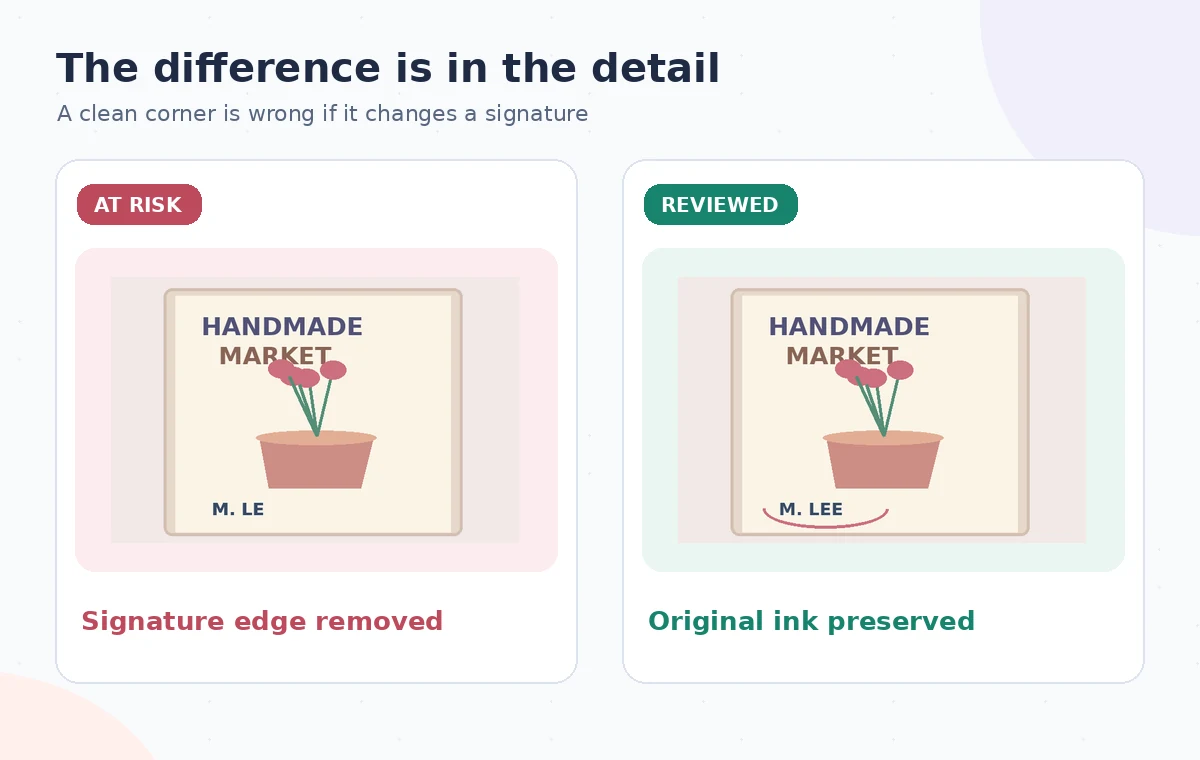
A craft collective wants to reuse a photographed event poster. A loose studio power cable crosses an empty lower corner near the artist’s handwritten signature. Recraft’s AI Eraser can remove unwanted objects and generate a replacement background, but a brush stroke that touches an important signature can permanently change the apparent author of the work. This hypothetical example keeps the signature as the central quality requirement, not as a decorative afterthought.
Separate the removable distraction from the artwork
Examine the source at full resolution and identify the actual cable, the paper edge, the artist’s ink, and any intentional graphic elements. A cable draped across blank margin may be removable for a promotional derivative; a cable that covers part of the signature is a different problem. If a stroke is already hidden in the source, generative editing cannot provide reliable evidence of how that stroke was drawn. Request a new photograph or the artist’s original file if documentation of authorship matters.
Make sure the collective has permission to edit and distribute the artwork. Preserve an untouched file and a separate working derivative. Decide in writing whether the goal is a cleaner advertisement or an archival reproduction. An archival version should generally retain the scene as photographed, including incidental objects. Promotional cleanup can be acceptable with approval, but it should not hide a material defect or misrepresent the original signed object.
Understand what Recraft Erase actually changes
Recraft describes an AI eraser that removes selected pixels and fills the area with surrounding visual context. Its public guide shows importing or generating an image, selecting an erase-area tool, outlining the unwanted item, and deleting the area. The company also describes a selection workflow with lasso, brush, area, and wand methods. The exact toolbar may evolve, so distinguish the operation that regenerates a background from a scissors-style cutout that removes pixels to transparency.
This distinction matters near an ink signature. An eraser fill may invent continuous paper grain and accidentally continue or erase a dark pen line. A transparent cutout can instead leave a visible hole that needs controlled repair elsewhere. Neither method knows the artist’s intended stroke. Verify file-type limits, plan-specific access, and whether the editing option is enabled before presenting the workflow as universally available.

Build a narrow selection around the cable
Open the duplicated poster and zoom in on the lower margin. Outline the cable with enough room to include its visible shadow, but stop short of the signature’s ink and any printed date. Recraft’s selection instructions discuss making selections and subtracting from them; use that refinement to protect details if your version offers it. Save the mask configuration or screen capture internally for auditing, but do not present an interface reconstruction as a genuine product screenshot.
Treat the cable’s path in short sections if it approaches an important mark. This can make it easier to see which segment produces a poor fill. A giant selection spanning the poster is more likely to replace typography, paper texture, or the artist’s distinct corner flourish. If a critical ink stroke overlaps the cable, stop and obtain a cleaner source. The safe choice may be to leave the obstruction visible rather than invent the missing evidence.
Use the AI tool selection checklist
Compare the repaired paper against the original
After the AI Eraser produces a candidate, switch between the source and edited crop at the same scale. Inspect the paper grain, print halftone, border lines, and ink around the signature. The removed cable should not be replaced by repeating stamp-like texture or an implausible white stripe. Zoom out to see whether the repaired corner appears oddly smooth compared with the rest of the poster. A natural-looking reconstruction is still synthetic, so do not confuse visual plausibility with historical fidelity.
Pay attention to subtle changes in the signature’s first and last letters. Compare the raw ink geometry rather than asking an AI to read the name, because an automatic transcription may normalize stylized handwriting. This is not an attempt to authenticate a signature. If the output changes even one identifying stroke, revert that region and make a smaller selection, or use a manual non-generative repair where it is appropriate.
Keep color, typography and print marks untouched
A poster often contains event hours, venue addresses, sponsor marks, and crop guides. Those are factual or legal content and should not be regenerated as background texture. Mark them as protected zones before erasing. If a cable runs near a QR code, the code must be rechecked with a real scanner after editing; apparent visual continuity does not guarantee it still works. Do not ask the model to recreate a missing URL, price, or sponsor name from its own guess.
Inspect edges around the intervention for color shifts and artificial shadows. A uniform new patch may not match aged paper, while a repeated motif can introduce a counterfeit pattern. If cleanup is for a social card rather than an archival record, a crop or layout adjustment may be simpler and safer than generative fill. The goal is minimum necessary alteration, not eliminating every trace that the poster was photographed in a real studio.
Plan a safer multi-tool workflow
Export a clearly identified promotional derivative
Export the corrected composition in a suitable format for the destination and reopen it. View the full poster at phone size and the signature region at full zoom. Check that the printed title, date, artist mark, and any QR code are intact. Keep a copy of the untouched source in the approved project folder, plus a plain-language note that the cable was digitally removed for a promotional version. Get the artist’s sign-off before widely redistributing the altered work.
Do not use the cleaned promotional image as photographic proof of the original physical poster’s condition. If the collective later needs a collection record, return to the unedited master. This example makes no claims about a live Recraft generation or measured edit quality; the comparison panels are constructed to teach what can go wrong near important ink.

Decide when not to use the Eraser
Skip generative erasing when the cable covers the only visible signature, when the image documents an incident, or when the original image is itself the object of historical study. If the client asks for a clean product advertisement, clarify what they own and what they are permitted to modify. A person reviewing a polished image cannot necessarily tell which pixels were reconstructed, so a durable original and approval record are essential.
For a routine marketing edit, make success falsifiable: the unwanted cable is gone, the signature’s visible strokes are identical, protected text matches the source, and no synthetic artifacts distract at publication size. If one check fails, publish the unaltered image or arrange a reshoot. Recraft is a visual editing tool, not an authority on authorship or object provenance.
How We Research
We checked the named vendor documentation: Recraft: AI Eraser tool and Recraft: Editing with the selection workflow. We compared its stated user controls, availability warnings, workflow stages and limitations against the concrete scenario described here. We then developed original educational diagrams and a separate human-review procedure for the materials that need independent evidence. The scenario is hypothetical: we did not sign into a paid account, upload a real customer asset, operate the feature on the example, or measure output quality. The figures are schematic, not actual interface captures or recorded processing results. Product menus, permissions and plans can change; verify the current installed edition and applicable policies before relying on this method.
Frequently Asked Questions
It uses AI to regenerate the selected area, so nearby visual context and edges can also look different after repair.
No. A fabricated ink stroke is not evidence of what the artist originally wrote; request a cleaner source.
No. Recraft documentation distinguishes AI-filled erasing from removing selected pixels to a transparent area.
Compare signature strokes, paper texture, important printed text, any QR codes, and the exported file against the master.
Not by itself. Keep the original and describe a cable-removed version as an edited promotional derivative.