
A travel museum wants an animated illustration of a lighthouse with a gentle leftward camera move. The director can describe that motion in words, but a short movement reference gives the generator a more specific example of framing behavior. Adobe Firefly documents a motion-reference workflow separate from uploading a still image to fix the first frame. Here we construct a motion-only brief and an inspection chart for the lighthouse. The accompanying images are instructional diagrams, not authentic Firefly screenshots or a generated video we tested.
Define the shot and separate motion from visual identity
Write two approval statements. The scene statement describes a fictional cliffside lighthouse with red roof, blue water, and no logos. The motion statement requests a slow leftward move while keeping the lighthouse readable. These are different things: a camera-motion reference should not be treated as permission to copy every element of a source video. Use a reference clip you filmed or have licensed. Make clear which features in the reference are motion cues and which scenic details must not transfer. Keep a stable target illustration with generous side margins so the virtual camera has room to move.
Locate the documented Motion reference input
Adobe’s Match camera motion help describes going to Generate video, finding Camera, choosing Motion reference, and uploading a short reference video. The help states an accepted reference window of five to ten seconds and a size below 200 MB; if the upload exceeds five seconds, only its first five seconds guide motion. Treat these as documentation current at review rather than permanent entitlements. Note the difference between composition reference, an uploaded first/last frame, and a motion reference. Because interface controls may disable each other based on selected inputs, keep a record of which mode was active for the exported proof.
Select a simple clip with readable camera travel
Choose a five-second reference with one intentional, smooth movement. Avoid an abrupt pan, large zoom, or multiple cuts when you are trying to teach a gentle leftward travel. On a tracking sheet, trace a stationary reference object’s position at the start, center, and end to reveal direction. Crop away irrelevant identifying information and make sure you have the right to submit the video to the service. If a shaky phone recording is the only option, either stabilize it deliberately or accept that shake may be reflected in the motion pattern. Do not upload a confidential client location simply because it has a convenient camera path.
Build a lighthouse frame with safe composition margins
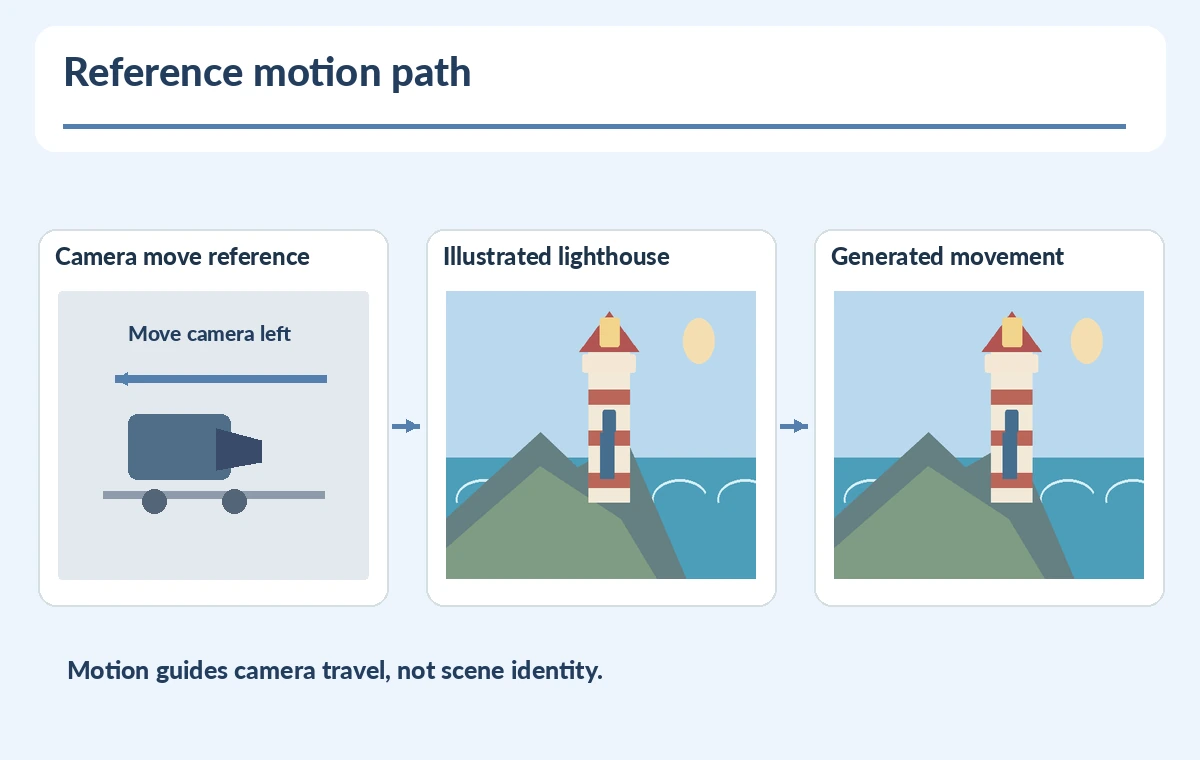
Draw the lighthouse to one side of the scene and leave extra ocean and sky so a move will not immediately crop off the tower. Fix lighthouse colors and geometry in a reference illustration approved by the art director. Adobe’s first/last frame documentation explains that frame input can constrain other camera settings; do not assume you can always combine first/last keyframes and Motion reference controls in the same way. The diagram compares a motion reference to a designed scene with only camera-path arrows connecting them. This is an editorial concept, not a reproduction of a product user interface or a measured output.

Evaluate direction and speed at multiple timestamps
Prepare a three-frame contact sheet from the exported clip. Draw a thin vertical guide through the lighthouse in each frame. A camera move should create a predictable relative shift without changing the tower into another building. Check that the horizon remains plausible, the red roof stays present, and the scene does not reveal unwanted borders. Revisit the first five seconds of the uploaded reference to compare directional intent; a longer uploaded source may not guide the way you expect. If the motion jumps, decrease complexity or prepare a cleaner reference instead of claiming the model matched perfectly.
Protect source rights and avoid misleading scenic claims
A generated lighthouse shot should be labeled as illustration when used in a destination guide. Do not associate it with a real landmark unless the identity and surrounding geography have been independently verified. Keep provenance for the reference video and any licensed illustration. If the final video includes safety information, navigation, or real tourist access routes, replace it with documentary imagery or review those claims with suitable local sources. Adobe’s generation workflow can help a designer visualize a movement; it cannot certify historical or geographical truth. Captions and place names should be added as editable overlays after visual proof.

Handoff motion specifications an editor can repeat
Archive the original movement clip, approved lighthouse art, prompt, model/setting notes, three proof timestamps, and a list of frame-level issues. Give the next editor a clear instruction such as “slow leftward drift, tower fully visible, no camera shake.” Keep separate notes for visual identity and motion so feedback does not become ambiguous. Export a preview for the expected screen ratio and verify text safe areas after crop. Do not invent percent adherence or benchmark scores. The project succeeds when the shot communicates the planned camera move and remains editable and clearly labeled.
How We Research
We reviewed Adobe’s Motion reference instructions and Adobe’s Generate videos using images help on October 28, 2026 for reference clip requirements, the first-five-seconds behavior, and the interaction with keyframe inputs. The lighthouse, storyboard frames, and motion analysis are editorial diagrams, not tested Firefly output. We have not confirmed any particular account’s feature eligibility.
Frequently Asked Questions
It guides camera movement, not ownership or factual identity of the depicted scene.
Adobe documents five to ten seconds and says only the first five seconds guide longer inputs.
No. Settings may be unavailable when first or last frames are supplied; check the active controls.
No. Validate and label geographical imagery separately.
A three-frame comparison with direction markers, stable objects, and timestamped defect notes.