
A beverage brand has an approved photo of its actual green glass bottle but needs a short digital ad concept. Runway Product Shot Video Builder can start from one product photograph, propose positioning choices, and generate an image that anchors a video. The challenge is not just making a cinematic shot; it is keeping the product truthful across the resulting frames. This guide provides a shot-approval card, label review map, and staged workflow without pretending to have rendered a Runway video.
Prepare a product packshot that can be checked objectively
Photograph or obtain a licensed packshot showing the true bottle silhouette, cap, logo, required label text and realistic glass color. Use a clean background, enough resolution to inspect fine print, and a named approved master image. Write down fixed attributes that must not drift: green glass, cream label, short neck, one cap and exact brand spelling. Also document which surrounding elements may be invented for a lifestyle scene. Do not use a digitally altered bottle as the sole source of truth if it already contains incorrect details. A reference sheet with a logo crop and cap crop gives the final reviewer objective points to compare.
Open the actual builder and set its four creative choices
According to Runway’s Product Shot Video Builder help, the feature lives in Apps, in the Video category, with a possible classic-app switch for accounts showing App Studio. Upload a product image and review the four positioning categories: color palette, target audience, environment, and ad concept. The interface suggests choices in each category; a Something else option allows a custom direction. Treat that documentation as a workflow rather than a guarantee that every workspace exposes identical menus. For a simple beverage concept, choose warm late-afternoon light, a café counter, and an understated rotating product introduction.

Separate the approved bottle from the creative scene
The product remains the truthful element; the setting is the creative variable. Specify the palette and environment without requesting a redesign of bottle geometry or label. Use a single anchor description so stakeholders can compare the result against the original packshot. Mark in advance which creative elements are allowed to change: flowers, background surfaces, steam or camera motion. Keep legal warnings, volume statements, and price overlays outside generated pixels and add them later in the editor using verified live text. Our accompanying illustrations show an imagined ad direction, not captured Runway output.
Generate and review the framed still first
The official builder guide describes Generate Image after selecting the positioning choices. Review the resulting still before building the video. Zoom into label strokes, cap edge, glass reflections and proportions. A good cinematic image is a poor product image if a second cap appears or the label is replaced with plausible nonsense. Compare a fixed crop from the source against the generated candidate at similar scale. Record issues as observable notes such as “label characters changed” or “cap shape is rounded,” not unsupported numerical quality scores. If the still is wrong, revise the positioning choices or return to a better source.
Storyboard the motion and verify every visible frame
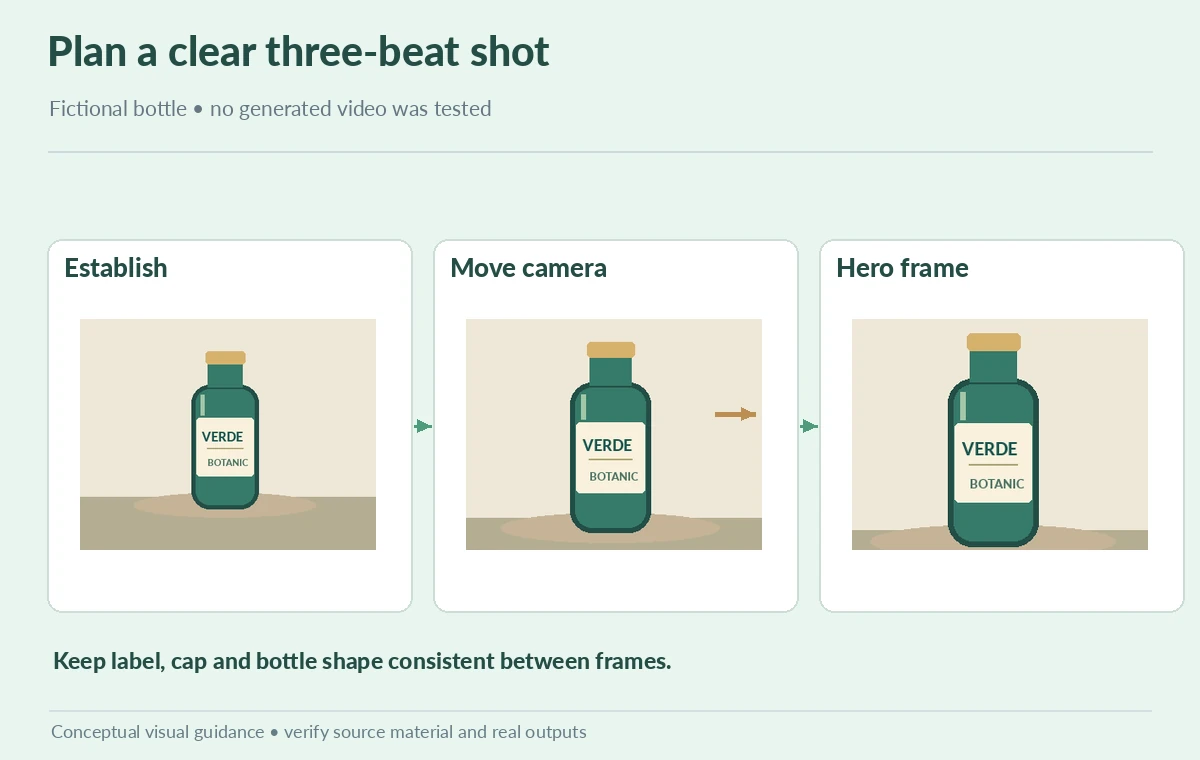
Use a compact three-beat sequence: establish the product, make one simple camera move, and land on a clear hero frame. Review the finished clip for temporal continuity, especially any moment the bottle rotates or a hand appears. Check whether the logo swims, glass highlights jump, the cap bends or a background object intersects the bottle. A still image proof cannot certify video continuity. If the movement distorts essential product facts, reduce the ambition of the motion or use a conventional photographed clip instead. Maintain a human review gate before a social ad or store listing uses the asset.
Account for disclosure, rights and technical delivery
Confirm permission to use the packshot, the brand name, music or voiceover if supplied, and any environmental references. Do not infer ad-platform approval or commercial rights simply because the generator has a marketing-oriented name. The Runway developer Product Ad recipe describes another API pathway with structured productImages and optional style references; it is not identical to the consumer Apps builder and should not be used as interchangeable instructions. Keep platform-specific aspect ratio, file requirements and current plan access in the final production notes. Preserve the original shot for comparison and label generated visuals according to the client’s disclosure rules. For the bottle campaign, build a frame ledger with columns for timecode, label legibility, cap shape, glass color and background interference. A frame at the end of a camera move can look accurate while the label mutates halfway through. Freeze a few representative frames, including the beginning, middle and ending hero moment, and compare the approved product reference at identical viewing size. If the logo becomes unreadable during rotation, remove that move or replace it with a shorter shot; do not cover the failure with invented rating numbers. A human sign-off against this ledger makes the video handoff auditable.

Deliver an auditable approval package
Create a one-page handoff with the original packshot, approved still, final video, four selected creative choices, and a frame-level QA log. Require a named owner to approve geometry, typography, claim accuracy and background context. Put factual calls to action and any prices in editable video or campaign layers, not generated texture. For every failed frame, note the timestamp and correction needed. Save the final aspect ratio, export format and destination platform in the handoff. The success criterion is a usable, truthful product asset with documented review, not an unsupported claim that a model produced a professional commercial automatically.
How We Research
On October 28, 2026 we reviewed Runway’s Product Shot Video Builder product help for Apps navigation, a single clean product image, four positioning categories and the Generate Image stage, plus Runway’s separate developer Product Ad recipe to distinguish API and Apps workflows. The green-bottle scenes, shot diagram and QA checklist are editorial illustrations, not a Runway video or measured result. We did not run the application.
Frequently Asked Questions
The Apps builder documentation starts from one clean product image. The separate developer recipe has different inputs.
A color palette, target audience, environment, and ad concept.
No. Compare the still and video frames against the real packshot.
No. Use the approved real label and add factual overlays as editable text in a later production step.
Original packshot, choices, approved still, video, frame-level notes, rights check and export settings.