
An AI album cover generator can turn a music brief into atmospheric art, yet distribution artwork has delivery rules unrelated to how attractive the picture looks. This guide follows an imaginary instrumental EP called Glass Harbor. The deliverable is a square cover with a checked title, a source and rights log, and a streaming-size preview. It uses Spotify’s published artwork requirements rather than unverified claims about algorithmic promotion. Generative imagery is an art-direction starting point, not evidence that sampled photographs or visual references are cleared for commercial reuse.
Start with a brief that describes music rather than an artist imitation
Write down the genre, mood, tempo, audience and one symbolic visual anchor. For Glass Harbor, the concept is a quiet coastal skyline at dusk with a geometric orange sun and muted blue water. Keep the request about composition, atmosphere and palette. Avoid asking a generator to reproduce a living cover artist’s signature style or the distinctive trade dress of an existing album.
Sketch three simple layout candidates: central silhouette, strong negative space for the title, and an abstract crop. Choose the direction that still reads when shrunk. A cover can represent the mood of music without including a photorealistic musician who never approved likeness use. Note who supplied reference images and whether the team can lawfully use them.
Set technical export rules before you create variants
Spotify’s cover-art requirements call for a 1:1 image, between 640 and 10,000 pixels wide and tall, a supported TIFF, PNG or JPG file, and sRGB color. Spotify also instructs artists to supply the highest-resolution image available and not to upscale. Those are platform requirements, not a quality score or a promise of approval on every distributor.
Make a square working master at the native resolution you can actually produce. Do not generate a tiny image and enlarge it solely to meet a distributor’s pixel threshold. Check the individual distributor’s submission guidance, because metadata, file processing and rejection rules can differ. Store the final exported dimensions alongside the file in an acceptance note.

Generate the scene, but keep title text editable
Use an image generator to explore color, lighting and composition, then add the EP title and artist name in editable design layers. Text produced within an image can be distorted or inconsistent across revisions. A simple two-line title set with a licensed font is easier to proof, align and localize than lettering woven into AI-generated scenery.
Keep all meaningful copy outside the fragile edges of the image. Test a version with text and one without. The generated scene must not include false awards, record-label logos or endorsements. If the work requires typography resembling an existing brand, reconsider the visual direction. Keep a short version history recording which image variant was selected and which human changes were made afterward.
Review composition as a thumbnail and at original size
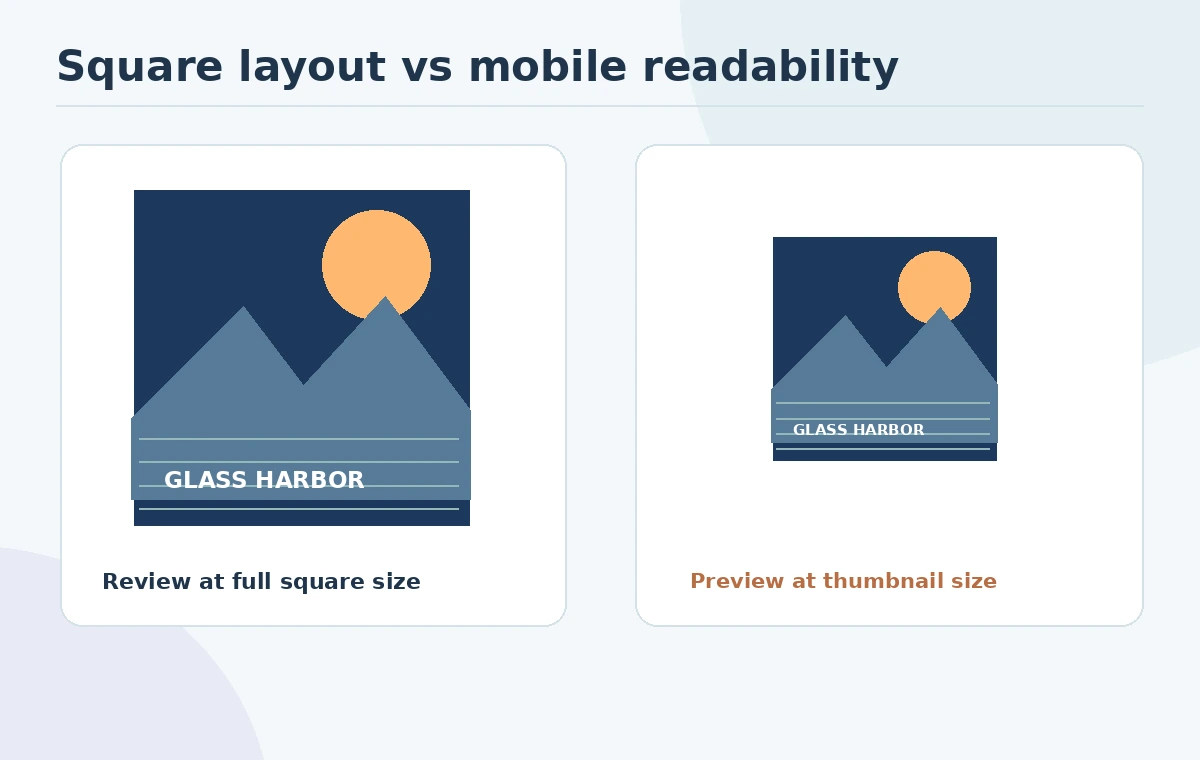
Shrink the square design until it resembles a streaming app tile. The subject and title should still be distinguishable. A coastal skyline with tiny text may look impressive on a 4K monitor and disappear on a phone. Check focal-point contrast, whether the artist name competes with the title, and whether the orange sun resembles another brand’s protected mark.
Open the native export at full size to inspect repeated patterns, stray shapes, halos and odd reflections. Avoid interpreting a visually polished render as proof of source ownership. If you choose a deliberately minimal cover, ensure it still feels intentional when displayed in a grid alongside other releases. Neither high contrast nor saturated colors guarantee playlist reach.
Document the artwork license and human contribution
Record the generation tool, model or mode used, account terms read, licensed source inputs, font license and any third-party assets. Different image tools can impose different conditions on free, paid or publicly shared generations, so avoid universal claims that AI artwork is automatically yours to sell. Seek permission for third-party photographs, identifiable faces and recognizable logos.
The US Copyright Office explains that AI-related copyright protection depends on identifiable human expression, not merely on entering prompts. See its AI copyright report summary. Keep a layered master that shows meaningful editing and arrangement, but do not treat keeping layers as proof of legal ownership. Consult a qualified professional for disputed or high-value commercial art.

Prepare a clean platform-specific file set
Keep an editable source file, one export conforming to the target distributor’s requirements, an unlettered art file and a short rights inventory. Use neutral file names that describe the release and version. Check that the square export is actually square and the file encoding matches the distributor instructions. Avoid embedding tiny legal disclosures as the only explanation of what was generated.
Check the cover against the final artist name and EP title submitted in release metadata. A mismatch can confuse listeners even if it is not a technical file error. Verify color conversion to sRGB using the export settings, then compare the exported file with the editor preview. This is a quality-control process, not an account-level upload or acceptance test.
Run a final release approval gate
The final gate should have named owners: design checks the composition and export, artist management checks naming and identity, and the rights owner confirms inputs and licenses. Review the image as an app thumbnail, a large square and a plain file-properties report. If any requirement fails, hold submission until a new export is reviewed rather than guessing that a platform will repair it.
For the fictional Glass Harbor project, the acceptance record states 1:1 canvas, supported file format, sRGB export, legible editable typography and rights documents attached. The example is not a generated or released real EP and makes no claim about acceptance rates. Keep the creative mood, technical eligibility and legal questions as separate approval categories.
How We Research
We consulted Spotify for Artists’ official cover-art requirements and the US Copyright Office’s AI copyrightability overview on October 27, 2026. Glass Harbor and its handoff checklist are editorial examples; we did not upload artwork to a distributor or certify copyright ownership. Our method was to compare published vendor feature descriptions with the article’s concrete decision checkpoints, avoid unsupported performance claims, and keep fictional illustrations separate from documented product behavior.
Frequently Asked Questions
A pleasing image is not sufficient. Check current platform and distributor rules, rights and file properties before submitting.
Spotify specifies a square 1:1 image between 640 and 10,000 pixels wide and tall.
Spotify lists TIFF, PNG and JPG, with its specified color and encoding requirements.
For accuracy and easy revisions, add title text in an editable layer and inspect the final thumbnail.
Do not assume blanket commercial rights. Review the tool terms, input licenses and any human-authorship implications.