
A thirty-minute nonprofit interview includes a speaker explaining how a community garden obtained permission, who maintains its beds and when volunteers can join. A 45-second social clip must accurately represent the speaker, not splice a conditional claim into an unconditional promise. Riverside Magic Clips can identify moments in recordings, pace them and add captions. This workflow starts with a transcript and ends with a context-checked excerpt, a caption proof and a downloadable file. The visuals are explanatory artwork rather than captures from a real Riverside session; no recording was processed while preparing this article.
Identify one answer that works outside a long interview
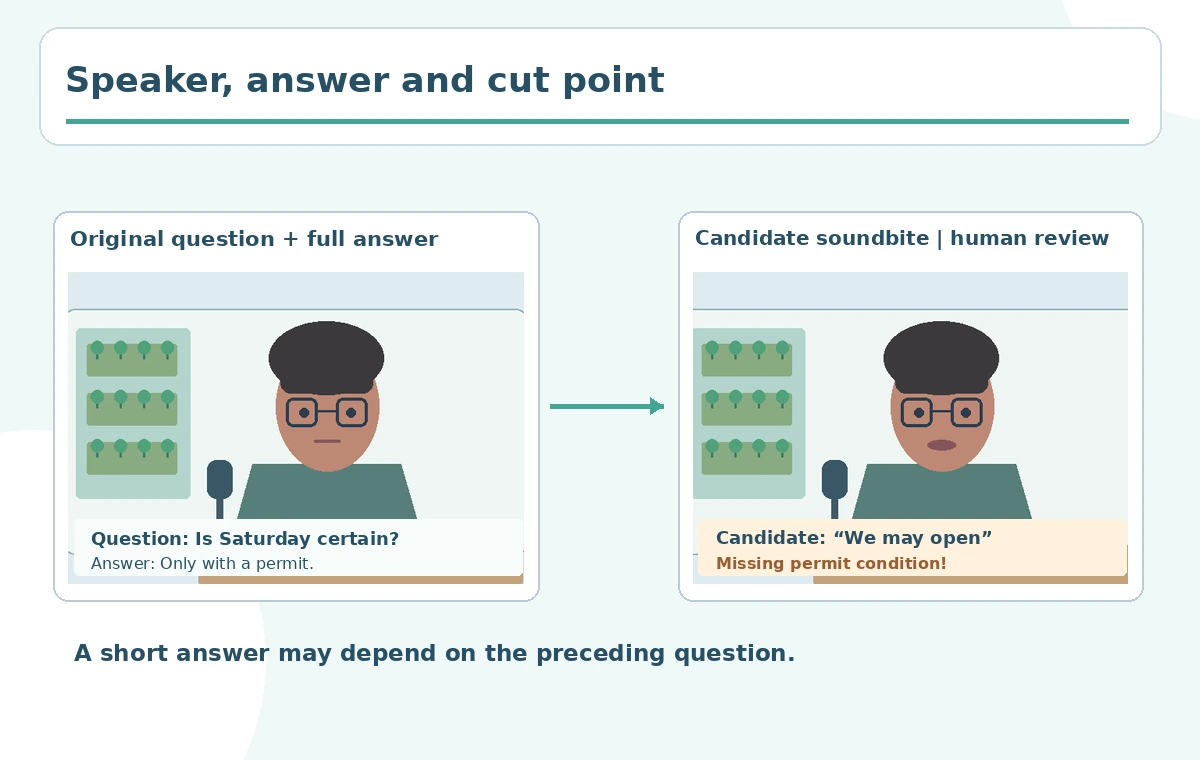
An engaging statement may still depend on the interviewer’s previous question. Choose a proposed takeaway, such as “volunteer signups begin after approval,” and write down which words must remain. Locate the complete source answer, including qualifiers and the question that prompted it. Define the intended clip length and target format, but prioritize understandable meaning over a predetermined second count. If the speaker says a program is planned, the caption should not claim it is operating already. Prepare a context checklist with claim, condition, attribution and source timecode for every quoted segment.
Understand the generated Magic Clips and the source they use
The Riverside Help Center overview explains that Magic Clips identify highlights in recordings or uploaded files, set pacing, add animated captions and allow subsequent customization in the editor. Existing suggestions are accessed from the project’s Made for You area. The help page says longer recordings with a transcript may receive an automatically generated set and that extra custom generations depend on the plan. This does not mean every suggestion will be publication-ready. The product selects likely moments, but a human must decide whether the statement is complete and correctly attributed. Save the uncut recording as the source of truth.
Choose speaker, keywords and length only where supported
Riverside documents custom generation options for eligible users, including target duration, speaker focus and keywords. Use “volunteer registration” or “garden launch” if those topics were truly discussed. Do not tell readers every plan offers unlimited custom generation; the official documentation distinguishes automatic clips from additional generations and lists different plan allowances. First inspect the automatic batch. If the correct speaker or answer is missing and custom generations are available, refine the keywords and duration deliberately. Each new version should be labeled with its source ranges and the precise change requested, rather than replacing an approved quote silently.
Review the entire original answer before choosing a candidate
Play at least the preceding question and the following sentence around any proposed soundbite. An excerpt like “we are opening on Saturday” may be contingent on permits or weather later in the answer. If an edit drops the condition, lengthen the quote or select a different part of the interview. Do not turn an answer into something the speaker never said by rearranging its fragments. The reviewer should be able to compare a short source transcript with the final clip and highlight each removed section. This is especially important in charity, health and finance topics where abbreviated language can change expectations.
Treat Magic Clips scores as comparative hints
Riverside describes a batch-relative score between 70 and 99 for certain generated Magic Clips and explains that it reflects perceived engagement or relevance within that batch. It is not an objective quality standard and does not demonstrate actual audience outcomes. Instead of publishing the highest number automatically, compare candidates against four clear criteria: factual completeness, speaker visibility, quiet enough audio and readable caption pacing. A less dramatic section that includes the necessary condition can be editorially stronger. Never state that the illustrated example received a Riverside score; numbers shown in drawings are illustrative review stages, not actual product ratings.

Edit the opening and captions without rewriting the speaker
Open the selected clip in the Riverside editor to inspect caption timing, names, terms and text wrapping. A proper noun like the garden’s name may be misheard; correct it based on the original audio and the organization’s supplied spelling. Make captions readable on a small phone screen, with safe margins above controls and without obscuring the speaker’s mouth. If you move the first cut, listen again for abrupt consonants and missing clauses. Any graphic slogan should be clearly separate from verbatim subtitles. A small human proofread is usually more valuable than another automatic generation round.
Decide when an AI Clipper chat is useful
Riverside also documents a separate AI Clipper agent that can create and adjust Magic Clips with conversational instructions. Do not confuse this agent with the standard Made for You discovery workflow. The agent help page says it can work with branded clips, captions and optional graphic or B-roll additions. For an interview about a local project, adding unrelated stock footage can imply that it shows the actual garden. Label illustrative B-roll or omit it when documentation is limited. The goal is a compact faithful answer, not a visually busy remix of unverified scenes.

Export the approved answer with a review note
After checking the transcript against the source, export the clip and watch the exact rendered media. Confirm that title cards, speaker identity and dates are accurate; that captions remain legible with platform interface controls; and that music does not overwhelm the speaker. Give the nonprofit a compact approval sheet: candidate source timecode, quoted takeaway, missing context risk, corrected proper nouns and final file name. If the interview includes a third party’s story, confirm the publication permissions for that segment. File the clip next to the original recording so any future correction can be traced and made quickly.
How We Research
On October 28, 2026 we consulted Riverside’s Magic Clips documentation and its AI Clipper guide for supported discovery, customization, scoring and export workflows. No audio was uploaded and no scoring benchmark was performed. The nonprofit garden transcript and illustrated decision gates are editorial hypotheticals, not an actual interview.
Frequently Asked Questions
Yes. Riverside documents using recorded and uploaded media.
No. Automatic sets and additional-generation limits differ by plan.
No. Riverside describes a relative engagement or relevance estimate, not a reach guarantee.
Yes. Edit and proofread captions in the clip editor before exporting.
A soundbite must preserve qualifiers, speaker identity and the original answer’s meaning.