
Learning how to use Rytr in 2026 begins with the Create workspace, not an old walkthrough of the former plan lineup. Create is the product’s writing surface for turning short briefs into drafts, rewriting text and adapting voice across emails, posts, ads and other formats. It sits alongside Engage, a different workflow for remembering contacts and preparing follow-ups.
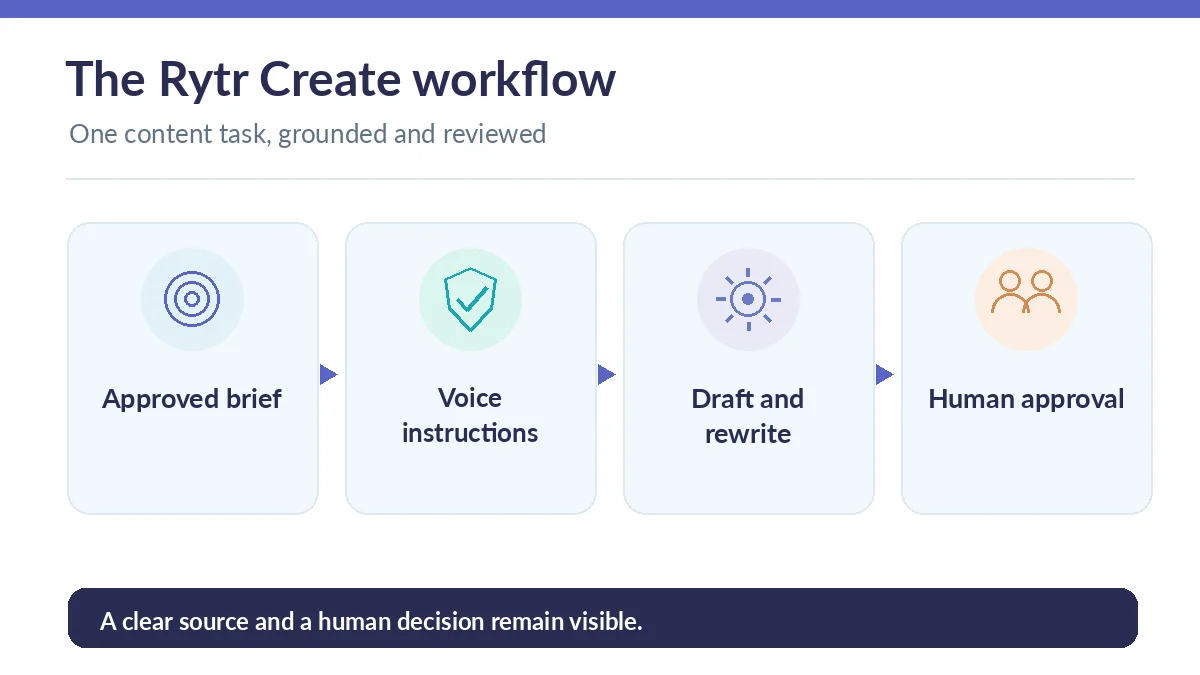
This practical guide gives a reusable method for a marketing email, a short social post or a product update without pretending that software verified the underlying facts. The objective is a faster first draft that still has a responsible human owner, confirmed source material and a clear final approval.
Choose a single deliverable and a real audience
Before opening a tool, identify the format, reader and next action. “Write marketing copy” is ambiguous; “draft a 100-word update to current customers explaining a verified new support window” is constrained enough to evaluate. Save any approved dates, links and product names beside the brief so the assistant cannot make them up.
Rytr’s current Create page advertises writing use cases for emails, social, ads, product pages and blog material. Choose the matching format as a starting point, not a substitute for editorial direction. If a listed template does not fit, use a straightforward instruction with audience, channel, required facts and prohibited claims.
Write a brief with factual boundaries
A useful brief has four parts: purpose, verified inputs, voice rules and a review requirement. For instance: audience is existing customers; purpose is a service change; confirmed facts are a date and support URL; tone is calm and direct; no invented guarantee, quote or discount may be added.
The source list should remain outside the generated prose until independently checked. Mark missing product claims as questions for the owner, not gaps the tool should fill creatively. For technical or regulated copy, include an explicit statement that the editor must verify every numerical and legal claim before publication.
Set recognizable voice rules instead of vague adjectives
Rytr Create emphasizes writing in your voice and supports tone selection. Rather than saying only “professional,” give operational instructions: prefer short sentences, use ordinary verbs, avoid “revolutionary,” retain official product spelling, and end with a specific approved next step. Provide one authorized sample paragraph when policy permits.
Voice settings help maintain consistency, but they do not grant permission to impersonate another individual. Read the first output for overconfident promises and removed caveats. If the message loses a safety warning or a deadline condition, correct the brief and regenerate only the affected passage.
Generate the first draft without trusting every detail
Use the current writing surface to generate the selected type of content from the brief. Rytr documents drafting, rewriting and improving text; exact interface labels can evolve. Focus on the produced message rather than chasing a particular screen position. Compare the result with the original facts and with the intended audience.
For an email, verify recipients, subject, requested action, dates and sign-off. For product copy, verify compatibility, measurements and return conditions. For an ad, verify that any claim is supported and not misleading. A plausible statement without a source is a problem to resolve, not a useful embellishment.

Use Rewrite, Shorten and Expand with a purpose
Rytr’s published features include Improve, Shorten, Expand and related rewrite controls. Apply one specific revision goal at a time: make an introduction shorter, replace jargon with common words, or make a transition clearer. Combining five stylistic goals in one instruction makes it difficult to spot when meaning changes.
Compare the altered text sentence by sentence. An expansion may generate an illustration that was never provided; a shortening pass may drop a qualifying condition. Preserve the source version and explicitly restore vital numbers, negations and scope limits. Revision should make a correct statement easier to understand, not transform it into an unverified promise.
Turn one approved brief into two distinct formats
Once a short email is accurate, adapt it into a social post by keeping the same verified facts but changing the lead and next action. Do not paste the entire email into every platform. A product email can explain context; a caption should highlight one useful point and send readers to the full notice for detail.
Keep a shared approved-facts sheet for both outputs. If a date, price or availability claim changes, update that sheet and review all derived drafts. Rytr may offer multiple formats and languages, but a translated message needs review by someone competent in the target language before release.

Separate writing assistance from Engage workflows
Create is for authoring and improving text. Rytr Engage is presented as source-connected relationship and follow-through assistance, with separate allowances shown in the pricing grid. A user learning to rewrite paragraphs does not need to connect mailboxes or buy a relationship-management tier by default.
If your organization later explores Engage, obtain permission for the connected data and keep a manual approval stage for outgoing communications. A generated follow-up should not be sent automatically just because it looks plausible. Verify the earlier conversation, promised actions and recipient details independently.
Publish only after a small quality gate
Use a final checklist: do all names and dates match the brief; are numbers traceable to evidence; is the tone appropriate; is the call to action accurate; are privacy and brand rules observed; has the owner approved it? Fix the source and brief when errors recur rather than repeatedly asking for cosmetic rewrites.
For repeat work, track the proportion of drafts accepted after normal review and the most frequent corrections. Do not describe this as an independent benchmark of Rytr unless you actually conduct and document a controlled study. The practical result is a reviewable process that reduces avoidable mistakes while leaving publication responsibility with people.
How We Research
We reviewed the official Rytr Create product page, its rewriting explanation, and the current tier and Engage allowance grid on October 26, 2026. The workflow is an editorial method built on described features, not a claim that we accessed a paid account, observed exact screen layouts or measured productivity improvements.
Frequently Asked Questions
Yes. Create focuses on generating and rewriting content; Engage emphasizes relationship context, follow-through and connected-source actions.
It can draft and adapt copy, but humans must verify product facts, claims, dates and approval requirements before using the content.
Reject or correct the sentence against the authoritative source, then revise the instruction to preserve that condition explicitly.
The current Free plan includes a limited writing-character allowance. Check which features your workspace offers before upgrading.
Only if you have the necessary permission and data-processing approval. Public or invented samples are safer for initial experimentation.