
A small tabletop game publisher needs a woodland courier character, shown as a fox carrying a satchel near a forest bridge. A single attractive image is not enough: the subject must be recognizable, the visual style must suit the book, and the layout must leave space for captions. Artbreeder Composer provides a useful distinction between content, style and composition sources. This guide explains how to assign reference roles before generating an illustration and how to document the final creative decisions without mistaking reference mixing for a guarantee.
Define three different jobs for the references
Create a content reference that establishes the fox’s triangular ears, rust-colored fur, blue satchel and ordinary proportions. Create a separate style reference for soft ink outlines, desaturated watercolor and paper texture. A third composition reference can be a rough bridge landscape with the fox on the left and blank caption space on the right. Keep the references individually labeled in your private brief. This separation stops a pretty landscape from accidentally becoming the source for character anatomy. The Artbreeder Composer announcement explicitly distinguishes style, content and composition roles. The instructional fox drawings here are original conceptual artwork, not content generated within Artbreeder.
Use a rights-cleared input set
Prefer sketches and photos the studio owns or has permission to use. A publicly visible community image is not automatically licensed for client merchandising, and a fictional animal face does not waive trademark checks on clothing emblems or props. Record creator, source URL, license and allowed output use for each input. If a human portrait is involved, verify consent before submitting it to image services. Keep private reference material out of a shared or public account if the service does not provide the controls you require. For our fox example, all three sources are simple fictional teaching drawings, so no claim is made about using licensed game art or another creator’s character.

Build a minimal concept with Composer
Artbreeder describes Composer as a way to mix images and text with role-specific control. Begin with only one content image, one style image and one layout guide, plus a short prompt describing the courier and bridge. Check the current interface for supported controls; do not copy legacy Mixer or Tuner instructions blindly. Generate a small set of exploratory concepts and choose one for analysis. If the composition loses the bridge, determine whether the guide was unclear. If the character turns into a generic fox, improve the content reference rather than adding more unrelated inputs. Document the configuration that was actually used for any published case study.
Treat Paint Mode as local direction, not perfect masking
In September 2024, Artbreeder announced Paint Mode within Composer, allowing images to be painted into regions of the canvas. For the game card, this could help place a lantern near the fox or concentrate a paper texture in the sky. It should still be followed by close inspection: region painting is a creative guide, not an assurance that neighboring paws or props remain untouched. Keep original layers or source sketches for manual correction. Our region map shows where content should appear, with arrows between the illustration and intended positions. It is a teaching diagram and not a replica of the product’s interface.

Inspect the character sheet against a fixed design checklist
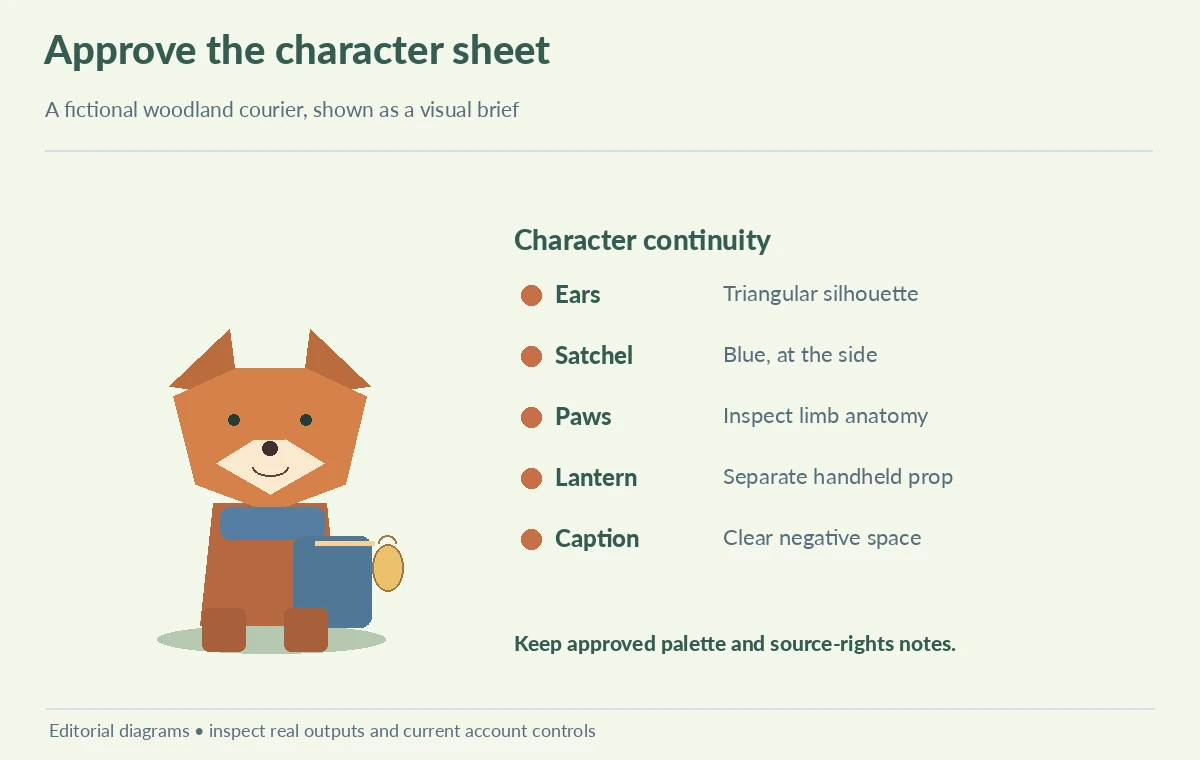
Compare candidate concepts using the same six observations: ear shape, satchel color, number of paws, lantern position, bridge silhouette and blank space for the caption. Check both full image and thumbnail. A design can satisfy the watercolor style and still fail the character brief if the satchel changes color or the fox has an extra limb. Do not assign model accuracy percentages without a repeatable benchmark. Flag which defects can be corrected in a standard graphics editor and which call for a new generation. The side-by-side illustration makes visual drift obvious by changing one motif at a time rather than hiding it behind decorative labels.
Build an editable approval sheet for game production
Prepare a one-page sheet with approved concept, mini silhouette, palette swatches, source-rights notes and a list of features that cannot change. If the image will become card art, leave a reserved type area and check whether downscaling hides the satchel and lantern. Export a small preview for the playtesting group and a separate high-resolution work file for the designer. Do not claim Artbreeder outputs will support a particular printer’s resolution or color profile without checking the export. Record who approved the character and whether the studio plans to adapt the design for multiple poses. These decisions belong in the art direction record, not in an AI-generated caption.
Choose Composer only when reference roles add value
Composer is particularly relevant when the creative challenge can be expressed as distinct subject, look and layout inputs. If the work is only replacing one object in a photograph, a localized image editor may make a clearer audit trail. If the exact official character art must be reproduced, start with the production original rather than asking an image model to infer details. Keep a reversible working file, human rights review and sign-off. Artbreeder’s tools list also includes Collager and Splicer 2, but do not merge their controls into a fictitious Composer screen. The final guide outcome is an understandable three-reference brief and a character QA checklist, not a promise of identical results.
How We Research
We checked Artbreeder’s official product updates and its live tools directory on October 28, 2026. Those sources support Composer’s role-based references, the Paint Mode announcement and the coexistence of other tools. The fox, bridge and approval examples are original artwork; we did not log into Artbreeder, benchmark its consistency or verify individual account limits.
Frequently Asked Questions
Artbreeder describes combining content, style and composition references with text.
No. Both appear separately in Artbreeder’s current tool list.
No. Check the image license and any person’s consent before upload or reuse.
Treat it as creative guidance and inspect the entire image for changes.
Approve the silhouette, character details, palette, legibility, source rights and export proof.