
Jasper Brand Voice is designed to help generated marketing content resemble the style of material a brand already approves. It is not a substitute for accurate product information or a legally reviewed claims sheet. When a brand voice sounds right but cites a nonexistent feature, the outcome is still unusable. Good setup therefore starts with representative writing examples, then tests voice separately from fact accuracy.
Jasper’s support documentation, updated in May 2026, describes creating a voice from up to eight samples and previewing results with and without the selected voice. This guide turns those steps into a repeatable quality check. It does not claim that LabFin ran Jasper in a paid account or independently measured its brand consistency.
Choose approved examples that represent one clear voice
Gather recent, approved copy that your audience actually saw: a high-quality product page, a customer-facing email and a polished educational article may form a useful collection. Avoid adding unreviewed drafts, competitor pages or multiple contradictory brand identities. Remove private customer details before uploading and confirm usage rights for every source.
For a brand that speaks differently to enterprise buyers and students, consider separate voice profiles rather than letting the tool average both into a vague middle. Jasper says a voice can be created from text, supported files or URLs, up to the documented sample limit. Select quality and consistency over maximal sample count.
Create the voice inside Jasper IQ
In Jasper, go to the Brand Voice area in Jasper IQ and choose to add a voice. Supply examples and review the generated voice description. The preview includes excerpts from the source material; compare those with the intended brand traits and remove an example if it brings in an unwanted tone or irrelevant jargon.
Name the voice descriptively, such as “US customer education — direct and calm,” rather than “Company voice 1.” Keep a note of the source owners, review date and intended channels. If the product interface differs from the documented navigation, follow current Jasper help rather than assuming an outdated screenshot must be correct.

Preview paired drafts with and without the voice
Jasper’s preview workflow supports example formats such as blog posts, LinkedIn posts and product descriptions. Choose a neutral, approved topic and request two versions: one with Brand Voice and one without. Read both blind before deciding which better matches your reference guide. A difference is not inherently an improvement.
Score the examples against four explicit criteria: sentence length, degree of formality, preferred vocabulary and treatment of claims. Capture specific excerpts, not a vague label like “sounds more authentic.” Ask a second reviewer to identify whether the voice overuses branded language in places where plain explanation would work better.
Keep voice, style rules and product knowledge separate
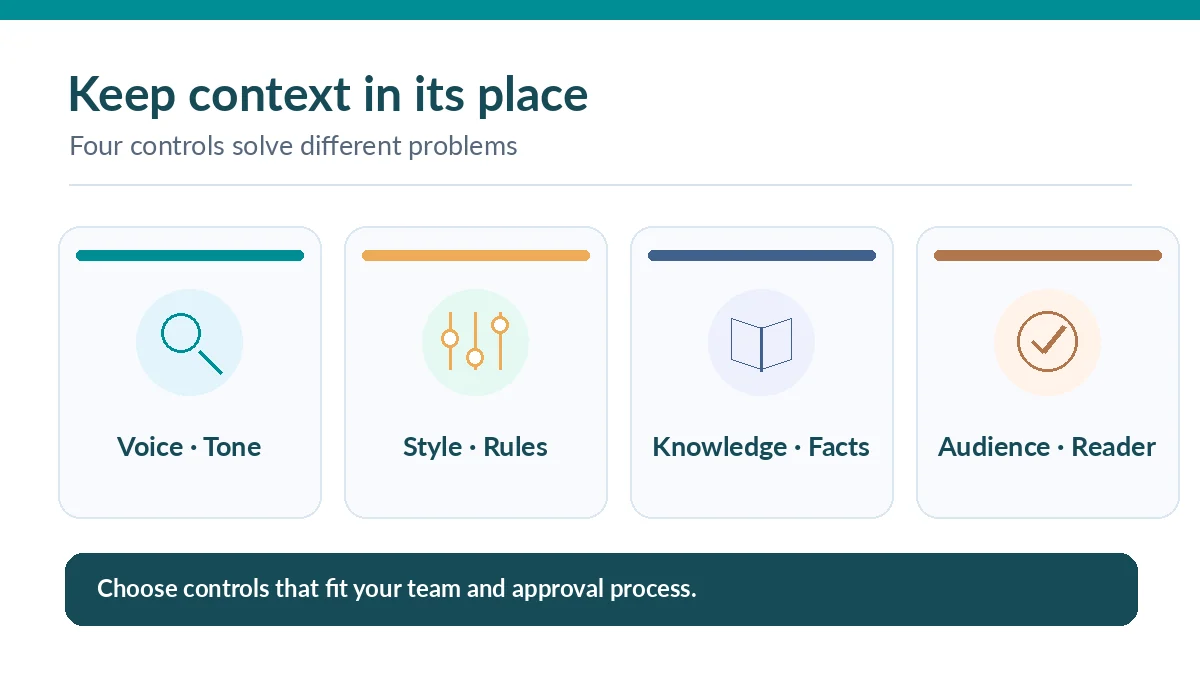
Voice tells a writer how to sound; a style guide specifies rules such as capitalization and prohibited terms; a knowledge asset records facts that must be true. Jasper IQ documents these as different context layers. Put an approved warranty period in knowledge, not in a stylistic phrase. Put a ban on unsupported superlatives in a review rule, not only in a sample email.
Make this separation concrete in your workflow: when a sample says “our fastest model,” identify whether that is an approved factual comparison or merely a familiar marketing phrase. Without verified evidence, remove the assertion even if it matches the brand’s tone.
Set workspace visibility and control editing rights
The help center describes workspace-visible and private voices, plus a default workspace voice configured by admins. Decide whether the voice is shared across the team or belongs to one client engagement. A global default is convenient but may produce wrong-brand text if writers switch accounts without noticing.
Before making a voice broadly available, confirm its owner, who may change source samples, how changes are reviewed and what should happen when a campaign requires an exception. Save a reference output before editing the profile so reviewers can recognize unintended shifts after a refresh.
Run a five-case stress test before production
Use five controlled briefs: a routine product explanation, a sensitive correction, a short sales note, an audience-specific education paragraph and a support-style apology. Supply verified facts for each. Ask the assistant to avoid unverifiable claims and to flag missing information. Keep the same prompt and sample facts across versions.
Rate each result as pass, needs edit or fail for voice, accuracy, clarity and risk. A cheerful brand voice may need deliberate restraint in an apology; a persuasive sales voice must not erase limitations. Record the problematic line and the rule it violates so that improvements are reproducible.

Maintain the voice when the brand changes
Set a review cadence around product launches, rebrands and major policy updates. Add approved recent examples only after reviewing whether they represent the long-term brand or a one-off campaign. Update product knowledge separately when specifications change, to avoid a style refresh silently changing factual assumptions.
Create a short change log: date, changed examples, reason, approver and paired before-and-after outputs. When a team adopts new terminology, verify that the relevant style rule and knowledge entry were updated as well. This discipline reduces the cost of unexplained drift.
Know when a Brand Voice profile is not the solution
If the draft hallucinates product details, improve the source packet and factual review. If the output ignores mandatory legal qualifiers, fix the claim rules and approval process. If one client’s material leaks into another’s draft, revisit workspace scoping and access settings. These are process or governance defects rather than inherently tone problems.
Jasper’s product pages advertise broad brand consistency, but outcomes depend on sources, prompts, plans and review quality. Treat the voice profile as one control in an editorial system. The last decision to publish belongs to an accountable human, especially when the copy contains consequential promises.
How We Research
We used the official Jasper Brand Voice help article (updated May 2026) for interface steps, eight-sample guidance, preview behavior and workspace visibility, and Jasper IQ documentation (updated September 2026) for the distinction among voice, style, knowledge and audiences. The five-case review rubric is our proposed editorial method, not a Jasper feature or verified performance score.
Frequently Asked Questions
Its May 2026 help article says a voice can be created with up to eight examples from supported text, files or URLs. Select consistent approved material.
Yes. Jasper documents a preview that generates versions with the selected voice applied and without it, useful for a controlled qualitative review.
No. Brand Voice guides tone and style characteristics; Knowledge Base content provides product and business facts. Both still need human checking.
Jasper documents a workspace default configured by admins. Review brand boundaries and exception processes before making one profile universal.
No. Source quality, instructions, factual accuracy, plan controls and human editorial decisions determine whether an individual output is suitable.